 Expedition Navigation Software
Click Here for Expedition Assistant - AI Chatbot
 1 of 1
- Vento Solare
- Admiral
 Offline
- From: Newport, RI
- Registered: 1/30/2019
- Posts: 43
Unable to Download US Model Tide Data
Using Windows 11 Pro and Expedition 12.9.9 for Navionics on both my Laptop & Desktop I am unable to get the US Tide Data for the areas I select. Specifically Long Island, Rhode Island & MA.
When I look in the folder C:\ProgramData\Expedition\tides the only data is the folder harmonics-dwf-20251228 which contains just that information. Here are some screen shots to show the sequence:
The desired US models are checked along with the Xtide Harmonics in the Tide settings: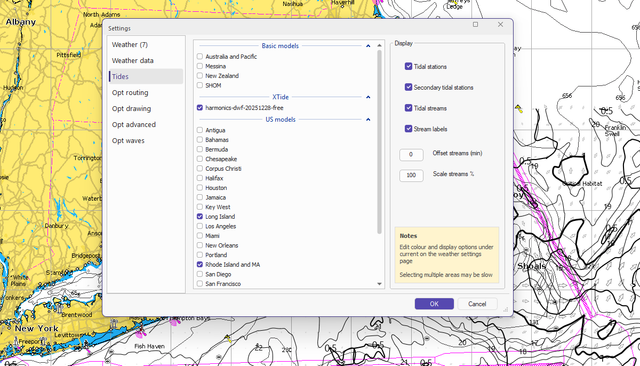
The area is highlighted on the chart from the WxData menu option, then Expedition clicked to download the grib data. This is the popup - note that the selected Tide areas set are not shown as potential sources to download.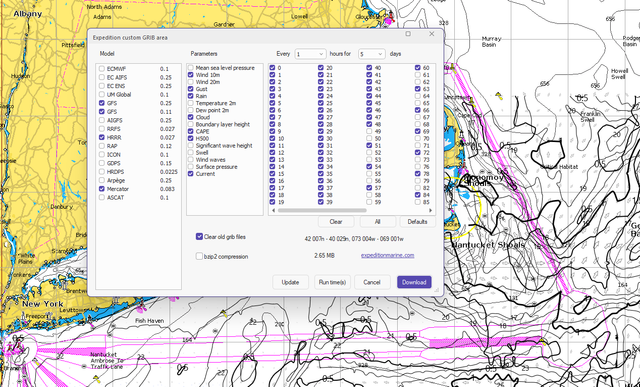
Any ideas?
Last edited by Vento Solare (9/16/2026 7:26 am)
- Nick
- Moderator
Offline
- Registered: 9/16/2015
- Posts: 3,522
Re: Unable to Download US Model Tide Data
Two completely separate things.
The Exp grib server downloads model data where available.
The tide models are coarse models included with Exp.
- Vento Solare
- Admiral
Offline
- From: Newport, RI
- Registered: 1/30/2019
- Posts: 43
Re: Unable to Download US Model Tide Data
Ok - What do I need to do to see the checked tidal data for the area I select, and make sure that tidal current data is used for optimal routing?
Last edited by Vento Solare (9/16/2026 1:25 pm)
- •
 Thread Starter
- Nick
- Moderator
Offline
- Registered: 9/16/2015
- Posts: 3,522
Re: Unable to Download US Model Tide Data
Have you seen the Tides settings page in Exp?
The colours, arrow type etc are controlled form the weather settings page to make it consistent with grib data.
Also, see the Tides settings topic in the help.
- Vento Solare
- Admiral
Offline
- From: Newport, RI
- Registered: 1/30/2019
- Posts: 43
Re: Unable to Download US Model Tide Data
Nick - I thought my 1st screen shot was the Tides settings page. What is the purpose of the check boxes for the sources there?
I now understand how to set the colors, arrow, etc. Thanks!
- •
Thread Starter- Nick
- Moderator
Offline
- Registered: 9/16/2015
- Posts: 3,522
Re: Unable to Download US Model Tide Data
Because that is where you select the various inetgrated models, harmonics etc - NOT the same thing as grib files you download from the the grib server.
Check out RaceData for iOS and Android. Expedition data in the palm of your hand, or on your wrist! RaceData
Interested in advertising here? Over one thousand active navigators and Expedition users visit this forum. Click here to contact the administrator.