 Expedition Navigation Software
Click Here for Expedition Assistant - AI Chatbot
 1
1 - Vento Solare
- Admiral
 Offline
- From: Newport, RI
- Registered: 1/30/2019
- Posts: 40
Bug Fixed: 12.8.12 & 13 tides and grib area selection broke
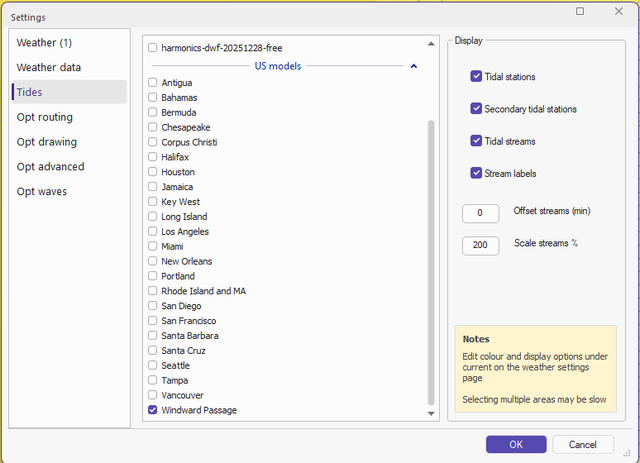
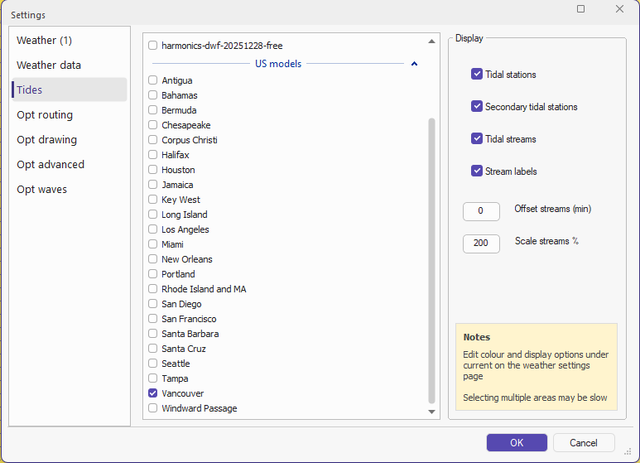
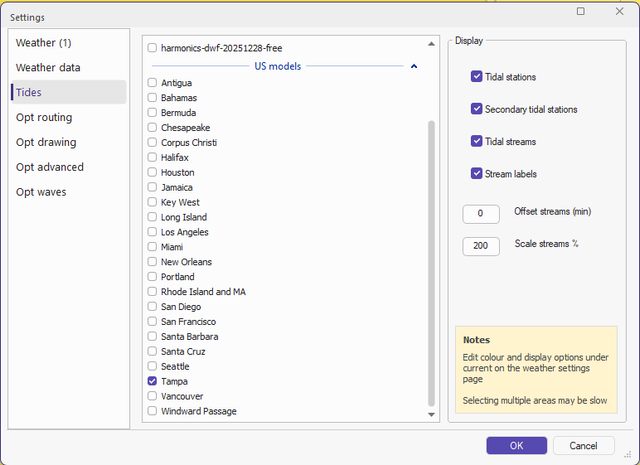
I updated my home PC with 12.8.12 (also .13) for Navionics and was doing tides weather download. Something messed up the check boxes selected in Wx Data, Settings, Tides. If I select my desired area in the US Models and click ok, then reopen the same dialog the area I clicked is not stored. It stored some other area. Playing with it appears there is some offset that is getting inserted as it will consistently save the wrong area when reopened. When I find the improper offset area that saves the one I want as confirmed by reopening the dialog but not saving it (use cancel) it will properly download the selected area. I am unable to get the checkbox for the XTide free harmonics file to stick when saved.
I did not update the boat PC until I'm sure this is fixed.
Is this an update bug or maybe a corrupted database? What can I do to fix this?
Thanks,
Bill
Last edited by Vento Solare (7/21/2026 3:08 pm)
- Nick
- Moderator
Offline
- Registered: 9/16/2015
- Posts: 3,468
Re: Bug Fixed: 12.8.12 & 13 tides and grib area selection broke
It seems ok here.
Do you have just one xtide in the list?
- Vento Solare
- Admiral
Offline
- From: Newport, RI
- Registered: 1/30/2019
- Posts: 40
Re: Bug Fixed: 12.8.12 & 13 tides and grib area selection broke
Nick,
Yes - a single value is checked and I also want to check the xtide harmonics file but am unable to save that selection.
It appears to be some offset when the checkbox is submitted that walks the saved value up the list. See the attached screenshots that were produced in sequence. I selected a single value and clicked ok. Then reopened the tide selection which opened another value up the list from what was saved.
- •
 Thread Starter
- Nick
- Moderator
Offline
- Registered: 9/16/2015
- Posts: 3,468
Re: Bug Fixed: 12.8.12 & 13 tides and grib area selection broke
That is odd.
You could try the Exp system restore app or deleting this in the registrySoftware\\Expedition\\expedition\\tides
- Vento Solare
- Admiral
Offline
- From: Newport, RI
- Registered: 1/30/2019
- Posts: 40
Re: Bug Fixed: 12.8.12 & 13 tides and grib area selection broke
I tried both deleting the registry folder and full system restore. Same problem.
- •
Thread Starter- Nick
- Moderator
Offline
- Registered: 9/16/2015
- Posts: 3,468
Re: Bug Fixed: 12.8.12 & 13 tides and grib area selection broke
Maybe try running Exp as an administrator.
- Vento Solare
- Admiral
Offline
- From: Newport, RI
- Registered: 1/30/2019
- Posts: 40
Re: Bug Fixed: 12.8.12 & 13 tides and grib area selection broke
Same issue running as administrator.
- •
Thread Starter- Nick
- Moderator
Offline
- Registered: 9/16/2015
- Posts: 3,468
Re: Bug Fixed: 12.8.12 & 13 tides and grib area selection broke
I don't have any other ideas sorry.
- Vento Solare
- Admiral
Offline
- From: Newport, RI
- Registered: 1/30/2019
- Posts: 40
Re: Bug Fixed: 12.8.12 & 13 tides and grib area selection broke
If I delete Exp and do a clean install, how do I save the license key?
- •
Thread Starter- Campbell_Field
- Moderator
Offline

- From: UK
- Registered: 9/16/2015
- Posts: 316
Re: Bug Fixed: 12.8.12 & 13 tides and grib area selection broke
The license file should be preserved in the data directory, however you could copy it and save elsewhere.
:::Campbell Field::::::www.fieldyachting.com:::
Check out RaceData for iOS and Android. Expedition data in the palm of your hand, or on your wrist! RaceData
Interested in advertising here? Over one thousand active navigators and Expedition users visit this forum. Click here to contact the administrator.