 Expedition Navigation Software
Click Here for Expedition Assistant - AI Chatbot
 1 of 1
- radaroom
- Admiral
 Offline
 - Registered: 1/02/2020
- Posts: 47
Pebble Watch
I was using the Pebble watch with Ventus, but now the Pebble watch App isn't being carried in the Apple App Store.
Any workaround?
- barne
- Admiral
Offline
- Registered: 9/01/2017
- Posts: 59
Re: Pebble Watch
Pebble has been discontinued but an community-driven framework is in place:
I have been using pebble watches with a pebble.js script displaying data from an Expedition plugin (a websocket server using Expedition data). After installing the rebble.io framework, I was able to upload updated version of my pebble.js apps to the watches, no problems.
However, I don't know if you would be able to install the VentusPRO.pbw this way...
- simonfarren
- Admiral
Offline
- From: Colchester,Essex,UK
- Registered: 2/24/2025
- Posts: 12
Re: Pebble Watch
Hoping someone can help.... VENTUS PRO APP ON PEBBLE WATCHES
I have Ventus Pro App on my Doogee S61 pro phone (Android 12) works fine
I have sourced a Pebble 301BL Watch and soldered in a new battery working etc
I have got the Rebble.io APK working fine so i can add apps to the watch
I have managed to add the ventus app to the watch from Rebble.io and it runs but i cant see any data just the screen ready....
I am not sure if this App is the VentusPRO.pbw or whether i still need to load that to the watch... But my android 12 does not give me the option to side load this to the watch... Are there any other ways or what do i need to do...
I suspect i need the $9.99 in app purchase which is no longer selectable on the ventus pro app...? I have Expedition transmitting all ok to the Ventus Pro app but only on the phone...
I have written a simple guide in word but i dont know how to post it to this chat it would help others...
Pasted a few images below in this chat also
Any help would be soo much appreciated
This video helps!
and this link
cheers
Simon
- simonfarren
- Admiral
Offline
- From: Colchester,Essex,UK
- Registered: 2/24/2025
- Posts: 12
Re: Pebble Watch
HOW TO MAKE VENTUS PRO WORK WITH PEBBLE WATCH"Expedition" user v 12.6 Pebble watch updated to v3.13.3-rbl So I have got the Ventus Pebble "APP" now on the Pebble Watch.... by using REBBLE website APK and the Android user guide on thereVentus | App And got my android 12 Phone connected to the Rebble Boot IMPORTANT PART (so I can now choose Apps and Watch faces etc and upload to the watch all ok))From the Ventus manual on line - "After you do the In-App purchase click on the Pebble button on the Exp Com page" IS THIS THE MISSING PART NO LONGER AVALIABLE FROM VENTUS APP $9.99?>?>BUT THE PEBBLE BIT is included it seems in the Ventus Pro App anyway... The menu is there and now all works as belowTHE VENTUS PRO APP ON THE ANDROID PHONE HAS PEBBLE OPTIONS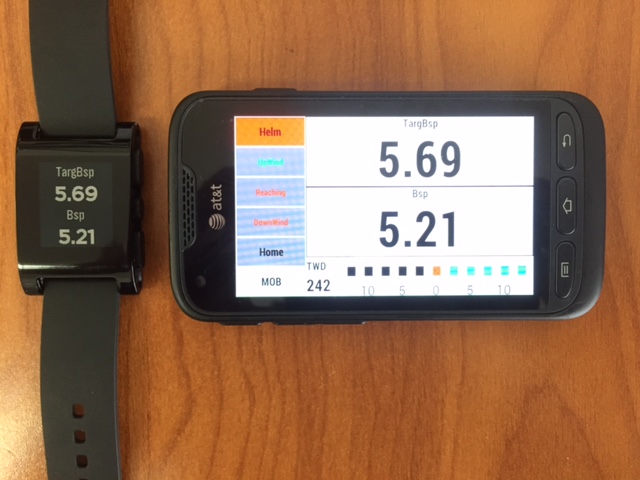 Pre-Set Pages - Ventus Navigation
Pebble Watch Support is now available for both our Android Version and iOS version of Ventus PRO. With the best Daylight Readable Display and battery life available it makes a great addition for Drivers or Trimmers that need to see specific data easily.ventusnavigation.com
Last edited by simonfarren (1/27/2026 11:53 am)
- simonfarren
- Admiral
Offline
- From: Colchester,Essex,UK
- Registered: 2/24/2025
- Posts: 12
Re: Pebble Watch
This works and tested upto Android 12, Android 14 did not seem to work (uses later Pebble APP) and connects via Bluetooth LE which could be the issue. (LE restricts bluettoth functionaility)
Step 1. Managed to Load a "Sideload" helper to then be able to load the ventuspro.pbw to the Android APP on phone and it then appears on the Watch face also.
As Ventus Pro (no logo) not Ventus (with logo dosent work)
Step 2: Run the Downloaded from Step 1 V1.4(5) 1.5Mb APK link then gets you this APP on your Android phone
Step 3: You can then use this to select the ventuspro.pbw file (from Ventus Pro website Pre-Set Pages - Ventus Navigation) from your downloads and side load it to the watch
Step 4: Then run the Rebble APP on the Android phone Rebble to Run Ventus Pro on the watch
Step 5: A REBOOT OF THE WATCH and restart the APP on Phone seemed to sort it now works!!Sometimes if you change the data fields they do not update on the Watch correctly, but if you restart the APP they seem to then work ok..
IMP NOTE: ALTERNATING Numbers do not seem to work correctly thats the only issue i can see and thats due to the VENTUS PRO app communicating with the Watch i believe i tried all different alternating time periods and could not fix it...
Maybe Harry can update the VENTUS PRO App to solve this....Its not an issue with Expedition as they work in the Android App, just not the watch.
I had some good images to accompany all these steps but its not easy to load them in here in sequence sadly.
However I have to say Campbell Fields Racedata 2 (RD2) App is better now so i might need to buy a Google Pixel 4 watch!
Last edited by simonfarren (1/28/2026 3:38 am)
- simonfarren
- Admiral
Offline
- From: Colchester,Essex,UK
- Registered: 2/24/2025
- Posts: 12
Re: Pebble Watch
By the Way I have also only got this working on Android 12, I tried it all on an Android 14 phone and it would not work...I think probably because it connected in LE Bluetooth mode rather than the full standard non LE mode. I cannot get it to connect in the standard Bluetooth mode either by using the later Pebble App or trying to use the phones bluetooth to connect. Therefore i run android 12 and its fine and connected in full bluetooth mode either via the Pebble APP or the phones blue tooth.
- Fergal
- Administrator
Offline
- From: Galway, Ireland
- Registered: 9/09/2015
- Posts: 180
Re: Pebble Watch
Simon, well done on getting the Pebble app working but I wonder if you have seen the new RaceData tools from Campbell Field? They provide similar or better functinality in a more flexible environment, prebuilt and supported. It runs on Android and Apple devices, providing the opportunity for everyone onboard to choose the data they want to see.
I think there is very little enthusiasm for the pebble and Ventus approach, that's why I moved it to the Archive
- simonfarren
- Admiral
Offline
- From: Colchester,Essex,UK
- Registered: 2/24/2025
- Posts: 12
Re: Pebble Watch
Fergal Yes I have I am using and Testing the RD2 Racedata2 App from Campbell and its brilliant.
Highly Recommend...
Your screen shots are good, would be worth updating them as the graphing functions now added are really good and Events to expedition also useful.
Probably time to buy a new watch i guess tbh.
I was down the VentusPro and Pebble road last year before Rd2 came out and its taken me so long to actually get the Ventus Pro to work on the Pebble i think main issue was only seems to work well uopto and inc Android 12.
Pixel watches,
Check out RaceData for iOS and Android. Expedition data in the palm of your hand, or on your wrist! RaceData
Interested in advertising here? Over one thousand active navigators and Expedition users visit this forum. Click here to contact the administrator.